


ブログ、動画、Q&Aなどの充実したオリジナルコンテンツが楽しめる、
「one room」公式アプリです。
one roomアプリの使い方
本アプリをご利用いただくには、初回のみ下記のSTEP1~2を行い、ログインを行っていただく必要があります。
※初回起動時はログインが必要です
※アプリ起動後すぐに強制終了されてしまう場合は、一度アプリをアンインストールしていただき、再度App Store/Google Playよりインストールし直してください。
■STEP1 ※初回のみ
■STEP2※初回のみ
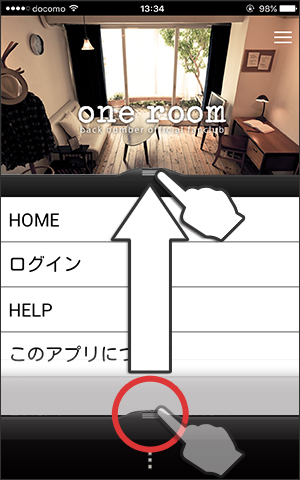
アプリを起動後、下のタブ部分を上にフリックするとメニューが出てきます。
「one room」の会員IDもしくはメールアドレス・パスワードを入力してログインしてください。
プッシュ通知について
プッシュ通知にてback number情報やone roomからのお知らせが届きますので、プッシュ通知を「オン」に設定してください。
操作方法
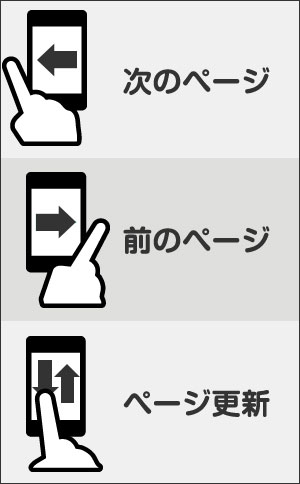
「one roomアプリ」ではフリック操作でページ移動やページの更新ができます。